• Shopping Cart Shopping Cart
    0Shopping Cart
Databuzz
  • Home
  • Services
    • FileMaker Development
    • FileMaker Integration
    • FileMaker Web Publishing
    • FileMaker Go for the iPhone and iPad
    • FileMaker Xero Integration
    • FileMaker WooCommerce Integration Specialists
    • FileMaker Shopify Integration Specialists
    • FileMaker DocuSign Integration Specialists
    • FileMaker MYOB AccountRight Integration
    • FileMaker MYOB Essentials Integration Specialists
  • Products
    • fmSMS
    • fmMMS
    • fmAccounting Link (Xero Edition)
    • fmAccounting Link (QuickBooks Online Edition)
    • fmEcommerce Link (WooCommerce Edition)
    • fmEcommerce Link (Shopify Edition)
    • fmESignature Link (Docusign Edition)
    • fmAccounting Link (MYOB AccountRight Edition)
    • fmAccounting Link (MYOB Essentials Edition)
  • Shop
  • Contact
    • Contact Databuzz
    • Support
    • Submit Testimonial
  • About Us
    • About Databuzz
    • Our Clients
    • Testimonials
    • Support
    • Databuzz Newsletter Signup
    • Terms and Conditions
    • Privacy Policy
  • News
  • Click to open the search input field Click to open the search input field Search
  • Menu Menu

Archive for category: fmAccounting Link (MYOB AccountRight Edition)

Eliminating Double Data Entry with eCommerce, FileMaker and Accounting Integration

December 12, 2017/0 Comments/in Accounting, Databuzz, eCommerce, fmAccounting Link (MYOB AccountRight Edition), fmAccounting Link (MYOB Essentials Edition), fmAccounting Link (Xero Edition), fmEcommerce Link (Shopify Edition), fmEcommerce Link (WooCommerce Edition), Integration, MYOB, News, Shopify, WooCommerce, Xero/by Andrew Duncan

Are you a small business that uses FileMaker to run your business (Contacts, Invoices, Suppliers, Leads etc) but also have an online store and use another accounting software? Do you find yourself re-entering online orders multiple times in your FileMaker CRM then once again in your accounting software?

There is a better way – we know as we once were in that situation ourselves. Over the past five years we’ve introduced a number of new systems into our business operations, including:

  • 2 online stores for our main Databuzz site as well as for our fmSMS product both running WooCommerce
  • switched from a  desktop accounting software to the Xero Cloud accounting platform

We also use the FileMaker platform internally to run our business and like many of our customers we suddenly found ourselves in the position where we had to enter a new sales order multiple times in different systems. The workflow for a new order became:

  1. receive notification via email of a new online order
  2. create a new order in our FileMaker CRM and copy/paste the customer and order details from the email
  3. logon to Xero and create a new Customer and Invoice and enter the Payment manually via copy/paste from FileMaker

The online order was being manually typed twice in FileMaker and our accounting software, leading to data entry errors and wasted time handling the same order multiple times. At Databuzz we like to “eat out own dogfood”  and most of our Products have been the result of a need to solve a problem within our own business that we suspected other businesses would also have. With the help of our fmAccounting Link (Xero Edition) solution as well as fmEcommerce Link (WooCommerce Edition) and the power of webhooks we’ve been able to completely eliminate all data entry for our online orders.

The new streamlined process looks like this:

  1. a new order is created in one of our online stores which triggers a WooCommerce webhook to push that new Order to our internal version of fmEcommerce Link (WooCommerce Edition).
  2. this calls a FileMaker script which then pushes the online order to our internal version of fmAccounting Link (Xero Edition). It checks to see if the customer already exists, otherwise it creates a new one.
  3. a staff member does a quick sanity check to make sure everything looks correct and then clicks a button to upload the new Invoice and Payment to Xero.

We’ve managed to reduce this business process from 5-10 minutes to 5-10 seconds –  this has freed up time to be spent on more productive tasks instead of mindless double data entry. Whether you’re using WooCommerce or Shopify for your online store and Xero or MYOB AccountRight/Essentials for your accounting it is possible to integrate all of these with FileMaker in the middle so that new online orders flow directly into FileMaker and then into your accounting software without any more double data entry.

If you would like to discuss integrating your FileMaker solution with your eCommerce system please contact us for a free initial consultation to discuss your requirements. We also have a number of FileMaker integration solutions available if you would prefer to do the integration in-house:

  • fmAccounting Link (Xero Edition): integrate FileMaker with the Xero Cloud Accounting Software
  • fmEcommerce Link (WooCommerce Edition): integrate FileMaker with WooCommerce
  • fmEcommerce Link (Shopify Edition): integrate FileMaker with Shopify
  • fmAccounting Link (MYOB AccountRight Edition): integrate FileMaker with MYOB AccountRight Accounting Software (Australia and New Zealand)
  • fmAccounting Link (MYOB Essentials Edition): integrate FileMaker with MYOB Essentials Accounting Software (Australia and New Zealand)
https://www.databuzz.com.au/wp-content/uploads/2014/07/databuzz-logo-small-300x88.png 0 0 Andrew Duncan https://www.databuzz.com.au/wp-content/uploads/2014/07/databuzz-logo-small-300x88.png Andrew Duncan2017-12-12 14:04:422017-12-12 14:04:42Eliminating Double Data Entry with eCommerce, FileMaker and Accounting Integration

Databuzz 2017 End of Year Xmas Sale – 20% Off All Licenses

December 9, 2017/0 Comments/in Databuzz, fmAccounting Link (MYOB AccountRight Edition), fmAccounting Link (MYOB Essentials Edition), fmAccounting Link (Xero Edition), fmEcommerce Link (Shopify Edition), fmEcommerce Link (WooCommerce Edition), fmSMS, General, News/by Andrew Duncan

The Databuzz End of Year Xmas Sale is now on – all Product Licenses are now 20% off, including:

  • fmAccounting Link (Xero Edition): integrate FileMaker with the Xero Cloud Accounting Software
  • fmEcommerce Link (WooCommerce Edition): integrate FileMaker with WooCommerce
  • fmEcommerce Link (Shopify Edition): integrate FileMaker with Shopify
  • fmAccounting Link (MYOB AccountRight Edition): integrate FileMaker with MYOB AccountRight Accounting Software (Australia and New Zealand)
  • fmAccounting Link (MYOB Essentials Edition): integrate FileMaker with MYOB Essentials Accounting Software (Australia and New Zealand)

The sale runs until the end of the day on the 31st December, 2017 (Australian Eastern Daylight Time). Free trial versions are available for all of our products – please contact us to request a trial version.

All our prices are in Australian dollars – if you’re purchasing from outside of Australia you’ll also get to take advantage of the low Australian dollar (1 Australian Dollar equals approximately 0.75 US Dollars).

Discounts are applied automatically – no coupons required! Click here to start shopping.

We also have a similar sale on fmSMS Licenses (20% off) – click here to visit the fmSMS website for further details.

https://www.databuzz.com.au/wp-content/uploads/2014/07/databuzz-logo-small-300x88.png 0 0 Andrew Duncan https://www.databuzz.com.au/wp-content/uploads/2014/07/databuzz-logo-small-300x88.png Andrew Duncan2017-12-09 15:58:042017-12-11 00:52:58Databuzz 2017 End of Year Xmas Sale – 20% Off All Licenses

fmAccounting Link (MYOB AccountRight Edition) Updated for Purchase Orders

November 1, 2017/0 Comments/in Accounting, API, FileMaker Pro 16, fmAccounting Link (MYOB AccountRight Edition), Integration, News/by Andrew Duncan

An updated version of fmAccounting Link (MYOB AccountRight Edition) has just been released which now includes examples for working with Purchase Orders, which has been a popular request from our customers. fmAccounting Link shows you how you can use FileMaker to:

  • download Purchase Orders from MYOB to FileMaker (all Purchase Orders or filtered by Purchase Order Date)
  • create Purchase Orders in FileMaker and upload them to MYOB
  • update a single Purchase Order from MYOB

This is a free update for all existing customers. You can view the full release notes on our version history page.

Our next update will include examples for working with Bills in MYOB and FileMaker. We’re also planning an update that will be ‘plug-in free’ for FileMaker v16 users, allowing you to use the fmAccounting Link (MYOB AccountRight Edition) solution natively under FileMaker Pro,  FileMaker Go and FileMaker WebDirect without having to install and manage plug-ins. The FileMaker v16 platform introduced some new cURL options and JSON functions which will allow us to perform the same functions as the plug-in provides when using FileMaker v16 – earlier versions of FileMaker will still need to use the plug-in functions.

If there are other features you would like to see in the core fmAccounting Link (MYOB AccountRight Edition) file please get in touch and let us know.

https://www.databuzz.com.au/wp-content/uploads/2014/07/databuzz-logo-small-300x88.png 0 0 Andrew Duncan https://www.databuzz.com.au/wp-content/uploads/2014/07/databuzz-logo-small-300x88.png Andrew Duncan2017-11-01 09:00:362017-10-31 23:44:00fmAccounting Link (MYOB AccountRight Edition) Updated for Purchase Orders

FileMaker Pro v16 Compatibility Update

May 9, 2017/1 Comment/in Databuzz, FileMaker Pro 16, fmAccounting Link (MYOB AccountRight Edition), fmAccounting Link (MYOB Essentials Edition), fmAccounting Link (Xero Edition), fmEcommerce Link (WooCommerce Edition), fmSMS, General, News/by Andrew Duncan

FileMaker Pro v16 was released today and we’re pleased to report that all Databuzz products are compatible with the FileMaker v16 platform. We haven’t encountered any issues with the following products in our testing with FileMaker Pro v16:

fmSMS – we have sent messages from multiple SMS Gateways, checked Account balances and checked the status of sent Messages successfully.

fmAccounting Link (Xero Edition) – we have been able to authenticate, download from Xero to FileMaker and upload from FileMaker to Xero successfully

fmEcommerce Link (WooCommerce Edition) – have been able to authenticate, download from WooCommerce to FileMaker and upload from FileMaker to WooCommerce successfully

fmAccounting Link (MYOB AccountRight Edition) – we have been able to authenticate, download from AccountRight to FileMaker and upload from FileMaker to AccountRight successfully

fmAccounting Link (MYOB Essentials Edition) – we have been able to authenticate, download from MYOB Essentials to FileMaker and upload from FileMaker to MYOB Essentials successfully

If you encounter any issues with any of our products and FileMaker Pro v16 please let us know. We’ll be writing more articles about some of the new features in the FileMaker v16 platform over the coming weeks – you can subscribe to our newsletter to be notified when they are released or follow us on Twitter or Facebook.

https://www.databuzz.com.au/wp-content/uploads/2014/07/databuzz-logo-small-300x88.png 0 0 Andrew Duncan https://www.databuzz.com.au/wp-content/uploads/2014/07/databuzz-logo-small-300x88.png Andrew Duncan2017-05-09 23:00:452017-05-09 21:45:12FileMaker Pro v16 Compatibility Update

Downloading the Xero/MYOB Invoice PDF

March 15, 2017/0 Comments/in Accounting, fmAccounting Link (MYOB AccountRight Edition), General, Integration, MYOB, News/by Andrew Duncan

Whether you’re using Xero or MYOB AccountRight for your business accounting software there are times when you would prefer to send your customer the Invoice that Xero and MYOB generate natively. For example if you have added an online Payment option to your Xero Organisation you might prefer to send the customer the Xero generated Invoice with the “View and pay online now” link in the PDF for customers to click and pay online with a credit card. Similarly if you’re using MYOB AccountRight you might to send your customer the invoice using one of the MYOB M-Powered layout forms.

For our fmAccounting Link (Xero Edition) solution we’ve already given users the ability to:

  • get the Online URL for an Invoice and include that in an email etc that they send to clients so they can choose the “View and pay online now” option
  • download the Xero Invoice PDF into a FileMaker container field and then save that to the desktop etc or include that in an email to the customer in place of a FileMaker layout based Invoice

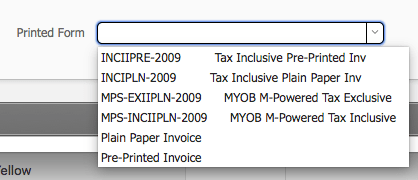
We’ve been working on creating a similar feature for our fmAccounting Link (MYOB AccountRight Edition) solution and it will be included in the next update. Like the Xero solution it will allow users to click a button to download the MYOB PDF invoice into a FileMaker container field and then save that to the desktop or include that in an email to the customer. We currently have the ability to download all the Form Templates setup in your MYOB Company File:

and then specify the Printed Form for each Customer in the fmAccounting Link (MYOB AccountRight Edition) file:


This is then used as the default when you request the MYOB Invoice PDF, however you can specify a different form template to be used by passing a parameter with the request for the Invoice PDF. Here’s a quick video that demonstrates creating an Invoice and then requesting the PDF from MYOB:

https://www.databuzz.com.au/wp-content/uploads/2014/07/databuzz-logo-small-300x88.png 0 0 Andrew Duncan https://www.databuzz.com.au/wp-content/uploads/2014/07/databuzz-logo-small-300x88.png Andrew Duncan2017-03-15 14:33:322017-03-15 14:33:32Downloading the Xero/MYOB Invoice PDF

fmAccounting Link (MYOB AccountRight Edition) Now Supports Jobs

January 31, 2017/0 Comments/in Accounting, fmAccounting Link (MYOB AccountRight Edition), General, MYOB, News/by Andrew Duncan

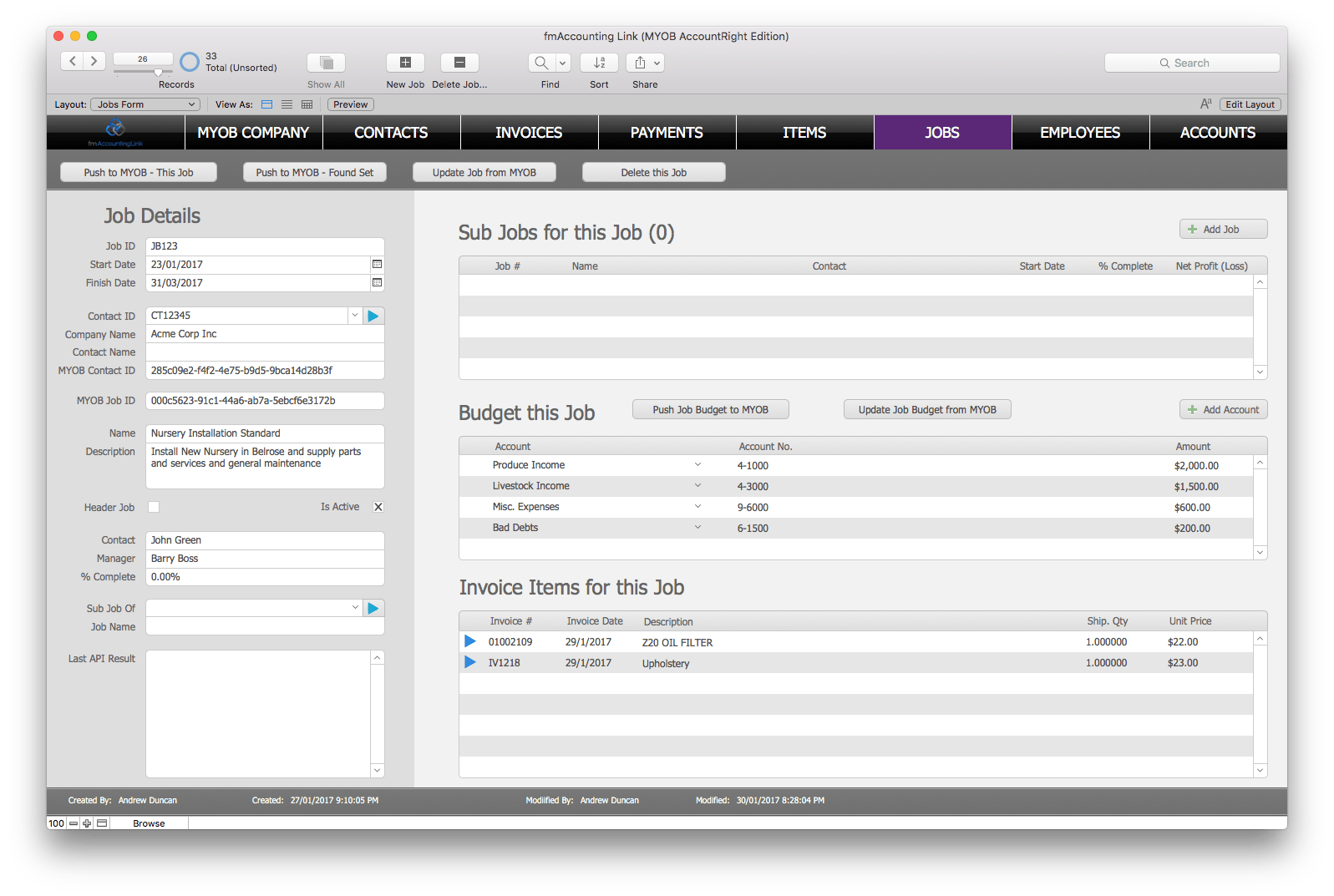
We’ve just finished an update to fmAccounting Link (MYOB AccountRight Edition) which now includes examples for working with Jobs, one of the most requested features from our customers. fmAccounting Link shows you how you can use FileMaker to:

  • download Jobs from MYOB to FileMaker (all Jobs or filtered by Start Date)
  • create Jobs in FileMaker and upload them to MYOB
  • update a single Job from MYOB
  • enter a Job against an Invoice Line Item or a General Journal Item
  • download a Job Budget from MYOB to FileMaker and send an updated version back to MYOB

This is a free update for all existing customers. You can view the full release notes on our version history page. If there are other features you would like to see in the core fmAccounting Link (MYOB AccountRight Edition) file please get in touch and let us know.

https://www.databuzz.com.au/wp-content/uploads/2014/07/databuzz-logo-small-300x88.png 0 0 Andrew Duncan https://www.databuzz.com.au/wp-content/uploads/2014/07/databuzz-logo-small-300x88.png Andrew Duncan2017-01-31 08:00:422017-01-30 20:31:38fmAccounting Link (MYOB AccountRight Edition) Now Supports Jobs

fmAccounting Link (MYOB AccountRight Edition) Updates – my.MYOB Login and General Journals

January 12, 2017/0 Comments/in Accounting, fmAccounting Link (MYOB AccountRight Edition), General, Integration, MYOB, News/by Andrew Duncan

We’ve been busy working on some updates to fmAccounting Link (MYOB AccountRight Edition) over the past few weeks. fmAccounting Link (MYOB AccountRight Edition) was a popular item during our recent End Of Year sale and we’ve had some great feedback from customers about features they would like to see in future releases.

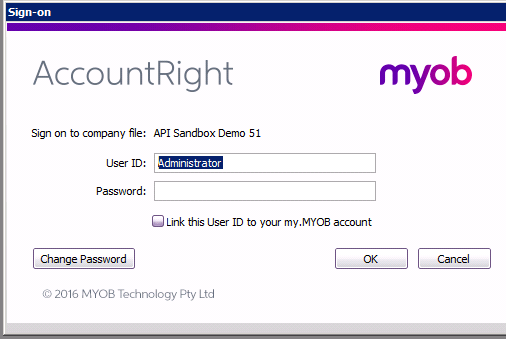
We’ve just released an updated version of fmAccounting Link  – v1.0.8. As well as the usual bug fixes we’ve added examples for working with the General Journals API endpoint – you can now download, create and update General Journals from FileMaker using fmAccounting Link. We’ve also added support for users that have linked their MYOB Company File User ID to their my.MYOB login – typically this is set using either of the following dialogs in AccountRight:

We couldn’t find anything about working with linked my.MYOB logins in the API documentation and after raising a ticket with MYOB developer support we were informed about the changes you need to make when working with linked my.MYOB accounts. We’ve added a new checkbox to the MYOB Company screen that allows you to flag that you’ll be using a linked my.MYOB login:

which handles the required changes automatically. For existing customers using older versions of fmAccounting Link you can simply disable a single script step to handle working with linked my.MYOB logins – see our FAQ page for details.

We’ve started working on adding examples for working with the JOBS API endpoint and hope to have this completed in the next few weeks. If there are features you would like to se in the core fmAccounting Link (MYOB AccountRight Edition) file please get in touch and let us know. You can view the full release notes on our version history page.

https://www.databuzz.com.au/wp-content/uploads/2014/07/databuzz-logo-small-300x88.png 0 0 Andrew Duncan https://www.databuzz.com.au/wp-content/uploads/2014/07/databuzz-logo-small-300x88.png Andrew Duncan2017-01-12 16:42:362017-01-12 16:42:36fmAccounting Link (MYOB AccountRight Edition) Updates – my.MYOB Login and General Journals

Databuzz 2016 End of Year Xmas Sale – 20% Off All Licenses

December 12, 2016/0 Comments/in Databuzz, fmAccounting Link (MYOB AccountRight Edition), fmAccounting Link (MYOB Essentials Edition), fmAccounting Link (Xero Edition), fmEcommerce Link (WooCommerce Edition), fmSMS, General, News/by Andrew Duncan

databuzz-xmas-sale-2016

It’s time for the Databuzz End of Year Xmas Sale – All Product Licenses are now 20% Off, including:

  • fmAccounting Link (Xero Edition)
  • fmAccounting Link (MYOB AccountRight Edition)
  • fmAccounting Link (MYOB Essentials Edition)

The sale runs until the end of the day on the 31st December, 2016 (Australian Eastern Daylight Time).

All our prices are in Australian dollars – if you’re purchasing from outside of Australia you’ll also get to take advantage of the low Australia dollar (1 Australian Dollar equals approximately 0.74 US Dollars).

Discounts are applied automatically – no coupons required! Click here to start shopping.

We also have a similar sale on fmSMS Licenses (20% off) – click here to visit the fmSMS website for further details.

https://www.databuzz.com.au/wp-content/uploads/2014/07/databuzz-logo-small-300x88.png 0 0 Andrew Duncan https://www.databuzz.com.au/wp-content/uploads/2014/07/databuzz-logo-small-300x88.png Andrew Duncan2016-12-12 00:30:502016-12-12 00:30:50Databuzz 2016 End of Year Xmas Sale – 20% Off All Licenses

Databuzz showcases SMS and Accounting Integration Solutions at 2016 FileMaker Developer Conference

July 19, 2016/0 Comments/in Databuzz, FileMaker DevCon, fmAccounting Link (MYOB AccountRight Edition), fmAccounting Link (MYOB Essentials Edition), fmAccounting Link (Xero Edition), fmSMS, General, News/by Andrew Duncan

Databuzz will be demonstrating their SMS and Accounting integration solutions at the 2016 FileMaker Developer Conference this week in Las Vegas:

  • fmSMS: our award winning 2 way SMS solution for FileMaker Pro, FileMaker Go, FileMaker WebDirect and FileMaker Server. fmSMS allows you to send an SMS from FileMaker Pro, FileMaker Go and FileMaker Server to almost any mobile phone in the world, reaching over 800 networks in more than 200 countries. You can get more information about fmSMS from the fmSMS website at http://fmsms.com
  • fmAccounting Link (Xero Edition): our solution that integrates between FileMaker Pro and the Xero Accounting Software. Xero is the market-leading small business cloud accounting software in Australia, New Zealand and the United Kingdom and is making great progress in the United States market. fmAccounting Link (Xero Edition) lets you upload and download Contacts, Invoices, Payments, Bills, Timesheets and more between FileMaker and Xero. You can get more information from the fmAccounting Link (Xero Edition) product page at http://www.databuzz.com.au/fmaccounting-link-xero-edition/
  • fmAccounting Link (MYOB AccountRight Edition): our solution that integrates between FileMaker Pro and the MYOB AccountRight Accounting Software (Australia and New Zealand). MYOB AccountRight runs either in the Cloud or on the Desktop, and fmAccounting Link (MYOB AccountRight Edition) allows you to upload Contacts, Invoices, Payments and more at the click of a button. You can get more information from the fmAccounting Link (MYOB AccountRight Edition) product page at http://www.databuzz.com.au/fmaccounting-link-myob-accountright- edition/
  • fmAccounting Link (MYOB Essentials Edition): our latest solution that integrates between FileMaker Pro and the MYOB Essentials Accounting Software, the easy online accounting software from MYOB (Australia and New Zealand). fmAccounting Link (MYOB Essentials Edition) allows you to upload Contacts, Invoices, Payments and more at the click of a button. You can get more information at the fmAccounting Link (MYOB Essentials Edition) product page at http://www.databuzz.com.au/fmaccounting-link-myob-essentials-edition/

    Databuzz will also be offering a DevCon show special for the entire week – all products will be discounted by 10% when you purchase via our online stores at:

    http://www.databuzz.com.au/shop

    http://fmsms.com/shop

https://www.databuzz.com.au/wp-content/uploads/2014/07/databuzz-logo-small-300x88.png 0 0 Andrew Duncan https://www.databuzz.com.au/wp-content/uploads/2014/07/databuzz-logo-small-300x88.png Andrew Duncan2016-07-19 01:38:402016-07-19 01:38:40Databuzz showcases SMS and Accounting Integration Solutions at 2016 FileMaker Developer Conference

The Benefits of FileMaker Integration with your Accounting Software

May 25, 2016/0 Comments/in Accounting, Databuzz, fmAccounting Link (MYOB AccountRight Edition), fmAccounting Link (MYOB Essentials Edition), fmAccounting Link (Xero Edition), General, MYOB, News, Xero/by Andrew Duncan

integration

The start of a new financial year is a great time to assess how your business has performed over the previous 12 months and start making plans for the next financial year. It’s also a good time to assess your business processes and put in place systems that help streamline the way your business works and contribute to the bottom line in the next fiscal year.

For Australian businesses the new financial year starts in a few weeks (1 July), for New Zealand and the United Kingdom is was on 1 April, for Canada it was 1 January and for the United States it was 1 October.

If you’re planning to make any changes to your accounting software and systems the start of a new financial year is the perfect time to implement these changes. You can use the weeks (and months) leading up to the new financial year to decide on any changes you wish to make, then develop and test these changes during the end of the current financial year before going live at the start of the new financial year. If you can’t wait for the start of a new financial year the start of a new quarter is usually the next best time.

Some of the questions you might wish to consider include:

  • does my Customer Relationship Management (CRM) software “talk” to my accounting software?
  • are my staff doing double data entry of Customers, Invoices, Payments etc in my CRM and my accounting software?
  • if I could eliminate any double data entry would that free up my staff to work on more productive tasks?

The ability to integrate CRM software with Accounting software has become much easier thanks to the rise of APIs. An API is an Application Programming Interface that a company makes available to other software developers – essentially it is a series of instructions for what you need to do to get your software talking to their software. In the small business space accounting software vendors such as Xero, MYOB and Saasu all provide well documented and reliable APIs that you can use to integrate your CRM software with their accounting software.

Having an API allows the accounting software applications to create an ecosystem of “add ons” that extend the functionality of usefulness of the accounting software, for example having transactions from a point of sale system automatically uploaded to the accounting software at the end of the day or being able to accept online payments for an invoice.

If you’re using FileMaker as your CRM application to track your customers, sales, invoices and payments there are a number of advantages of integrating it with your accounting software, including:

  • no more double data entry in FileMaker and the accounting software. Enter the invoice once in FileMaker, click a button and the invoice is pushed to your accounting software in a few seconds
  • less errors between your CRM system and your accounting system. Being able to push invoices, payments etc from your main system to your accounting system means there is less likelihood of data entry errors between the 2 systems
  • free up staff time for more productive work. Rather than having staff spend countless hours each week doing double data entry they can be freed up for more productive (and enjoyable) work, such as following up on sales leads, customer service, marketing etc.
  • it also allows staff to push data to the accounting software without giving them direct access to the accounting software

Having implemented a number of FileMaker/CRM and accounting integrations over the past 3 years we’ve seen the benefits first hand. One customer that processed hundreds of sales every fortnight has now freed up 1-2 hours of time each day for staff that were responsible for the double data entry of invoices. Now they enter the sale once into FileMaker, click a button and a few seconds later get confirmation that the invoice has been uploaded.

We’ve also integrated FileMaker with our accounting software in our business. Before the integration the workflow for processing an online sale was something like this:

  1. customer makes an online purchase from our webstore and a notification is sent us via email with the order details
  2. Databuzz staff manually create a new order in our FileMaker CRM system
  3. Databuzz staff then manually create the same invoice in our accounting software
  4. Once the invoice has been created we then manually add the payment details

Now that we have integrated our FileMaker CRM with our online webstore and our accounting software the process is this:

  1. customer makes an online purchase from our webstore and a notification is sent us via email with the order details
  2. Databuzz staff review the order in our FileMaker CRM which can show webstore orders live, then click a button to push that sale to our CRM and online accounting software, including the Customer, Invoice and Payment details

That saves around 5-10 minutes of data entry time per order – multiple this by tens or hundreds of orders and you can see the time savings add up quickly.

If you would like to discuss integrating your FileMaker solution with either Xero, MYOB AccountRight or MYOB Essentials please contact us for a free initial consultation to discuss your requirements. We also have a number of products which allow you or your in-house/external FileMaker developer to do the integration yourself:

  • fmAccounting Link (Xero Edition)
  • fmAccounting Link (MYOB AccountRight Edition)
  • fmAccounting Link (MYOB Essentials Edition)

A typical integration usually takes around 4-8 hours – in that time we can have your FileMaker system authenticating with your accounting software, uploading Contacts, Invoices, Payments and more. Imagine how much time and money your business could save by integrating your CRM with your accounting software.

https://www.databuzz.com.au/wp-content/uploads/2014/07/databuzz-logo-small-300x88.png 0 0 Andrew Duncan https://www.databuzz.com.au/wp-content/uploads/2014/07/databuzz-logo-small-300x88.png Andrew Duncan2016-05-25 09:00:182016-05-24 21:08:09The Benefits of FileMaker Integration with your Accounting Software
Page 2 of 3123

Latest News

  • fmMMS Updated to Support Additional MMS GatewaysJuly 22, 2026 - 11:24 am

    fmMMS, our FileMaker solution that lets you send and receive MMS messages from the Claris FileMaker Platform, has just been updated to include support for two additional MMS Gateways: Notifyre: based in Australia Notifyre is trusted by 20,000 Australian organisations and was named Australia’s Most Reliable SMS Provider for 2025. They support Australian and USA […]

  • Changes to MYOB Business API ScopesJuly 21, 2026 - 8:29 am

    MYOB have recently announced a change to the authentication scopes for MYOB Business API integrations commencing 1 September 2026. They are replacing the CompanyFile scope with more granular scopes to enhance data privacy and security.  All MYOB Business API integrations will need to update the scopes used to authenticate and re-authenticate to generate a new access token that […]

  • Changes to Xero Accounting API ScopesJuly 1, 2026 - 9:20 am

    Earlier this year Xero introduced a change to the authentication scopes for new Xero OAuth Apps that were created on or after March 2, 2026. They are replacing the previous broad scopes with more  granular scopes to give you more control and security. Xero OAuth Apps created on or after March 2, 2026 have been […]

  • fmSMS Now Supports Notifyre SMS GatewayJune 29, 2026 - 4:33 pm

    fmSMS, our FileMaker solution for sending and receiving SMS messages from the Claris FileMaker Platform, has been updated to support the Notifyre SMS Gateway based in Australia. The Notifyre SMS Gateway is trusted by 20,000 Australian organisations and was named Australia’s Most Reliable SMS Provider for 2025. You can download a trial version of fmSMS to […]

  • Databuzz releases fmESignature Link (Docusign Edition) v2 – Integrate the Claris FileMaker Platform with DocusignJune 9, 2026 - 6:00 am

    Databuzz today announced fmESignature Link (Docusign Edition) v2, a major update to their FileMaker solution that integrates with the Docusign eSignature platform. fmESignature Link (Docusign Edition) is a FileMaker solution that integrates between the Claris FileMaker Platform and Docusign. Docusign is one of the most popular electronic signature platforms and helps organisations connect and automate […]

Newsletter Signup

Subscribe to Blog via Email

Enter your email address to subscribe to this blog and receive notifications of new posts by email.

X Logo X Logo Followon X RSS Feed Logo RSS Feed Logo Subscribeto RSS Feed

Latest News

  • fmMMS Updated to Support Additional MMS GatewaysJuly 22, 2026 - 11:24 am

Newsletter Signup

© Copyright Splash IT Consulting Pty Ltd T/A Databuzz | ABN 31 116 889 028
  • Link to X
  • Link to Facebook
  • Link to Rss this site
  • Home
  • Services
  • Products
  • Shop
  • Contact
  • About Us
  • News
Scroll to top Scroll to top Scroll to top